
Home
Home is the screen you land on after signing in. Nothing is edited here. Every number and row links to the screen it summarizes.
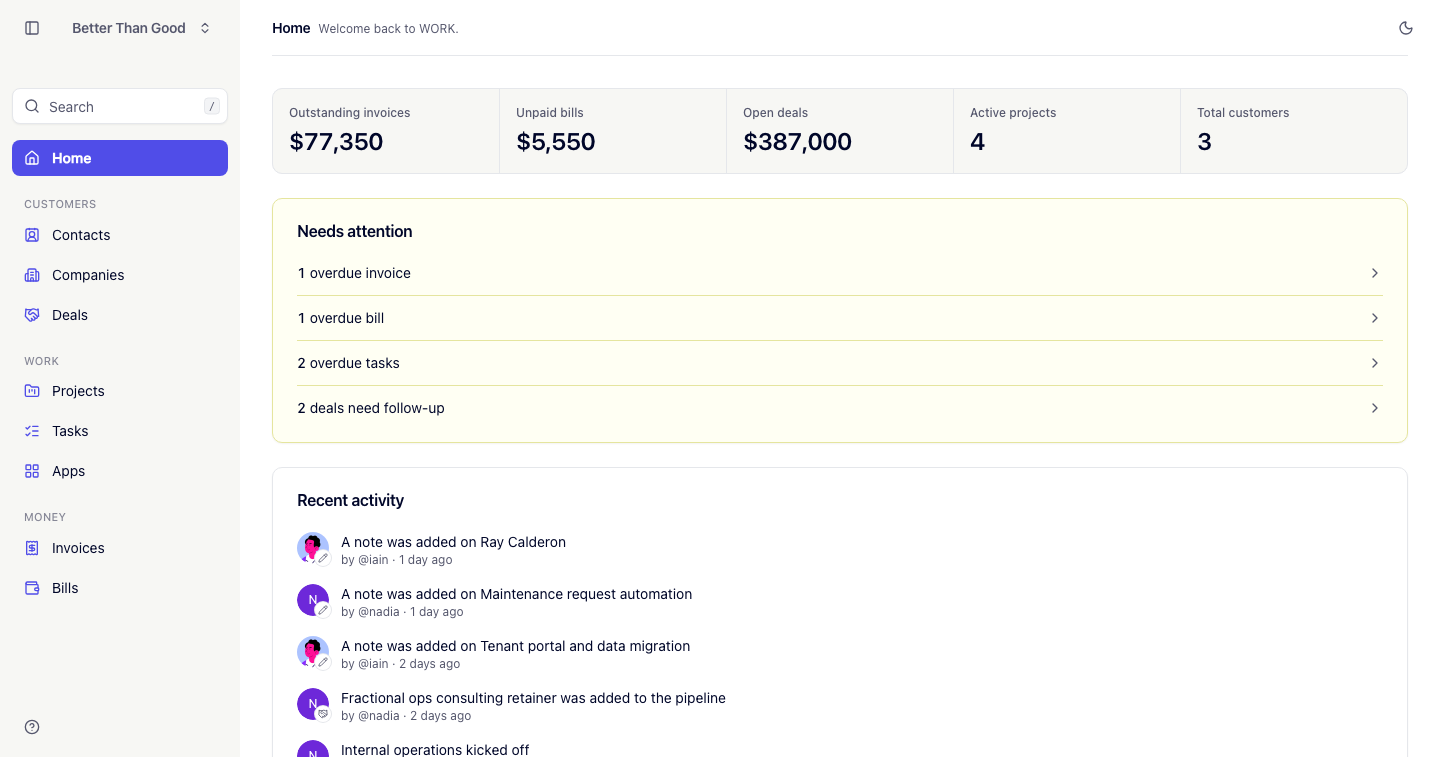
Business overview
A row of cards. Each links to the screen behind the number.
| Card | Shows | Links to |
|---|---|---|
| Outstanding invoices | Combined total of sent invoices | Invoices, filtered to Sent |
| Unpaid bills | Combined total of open bills | Bills, filtered to Open |
| Open deals | Combined value of deals in the Lead, Qualified and Proposal stages | Deals |
| Active projects | Count of projects not archived | Projects |
| Total customers | Count of companies with at least one won deal | Companies |
Needs attention
A list of counted items. Each row links to a filtered screen, and the count is written out in full (“1 overdue invoice”, “3 overdue invoices”).
- Overdue invoices: sent invoices past their due date. Links to Invoices, filtered to Overdue.
- Overdue bills: open bills past their due date. Links to Bills, filtered to Overdue.
- Overdue tasks: your open tasks past their due date. Links to Tasks.
- Deals need follow-up: open deals with no change and no note in the last 7 days. Links to Deals. Adding a note removes a deal from this list.
With no items, the card reads “Nothing needs attention.”
Recent activity
The eight most recent events in the account, newest first. Each links to the record:
- a company, contact or deal was added
- a note was added to a record
- an invoice was sent to a client
- a project kicked off
Before any activity, it reads “Nothing has happened yet.”
Recent activity is derived from current records and changes as they change. For a retained history of who changed what, see the Audit log.